Study in a nutshell
On BrowseComp, adding the tracker raised accuracy from 12.6% to 14.6%. The full system, BATS, reached 24.6% under the same limits.
Give a web-searching AI permission to run 100 searches, and it might stop after 14. That can be sensible if it has found the answer. It is a problem if it has found only a plausible name and still has clues to check.
In Budget-Aware Tool Use Enables Effective Agent Scaling, Tengxiao Liu and colleagues tested a small change: after each search or page visit, tell the AI how many calls it has used and how many remain. On one difficult web-research test, Gemini 2.5 Pro with this tracker and a limit of ten calls per tool reached 12.8% accuracy. A standard agent with ten times the allowance reached 12.6%, at a higher average cost.
The difference between finding a page and reading it
The agents had two tools. A search returned titles, short snippets and links. A separate tool opened a page to read its contents. Each had its own allowance. The tracker also gave the agent brief initial guidance on how to use a tight or generous budget. The team could change the way the agent worked without retraining the underlying model.
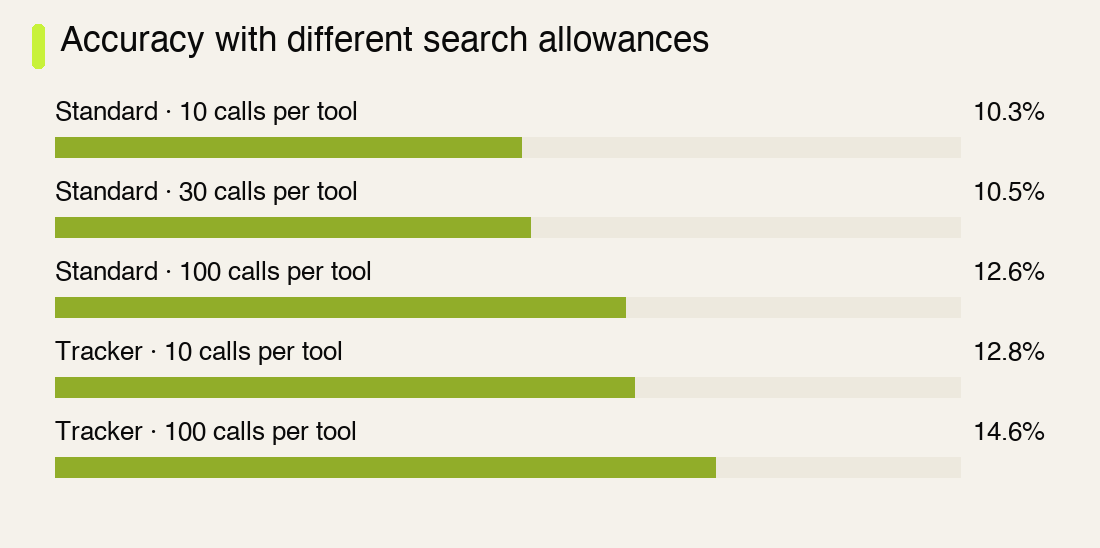
The tracker did not make every answer cheaper. At the same ten-call limit, it raised accuracy from 10.3% to 12.8% and average cost from 5.2 to 6.8 US cents. The saving appeared in a different comparison. The standard agent with a 100-call limit cost 9.9 cents and reached roughly the same accuracy as the tracked agent limited to ten. The authors counted both tool fees and the cost of processing text. A tenfold reduction in the allowance translated into a roughly 31% saving in that comparison.
Which search is worth spending next?
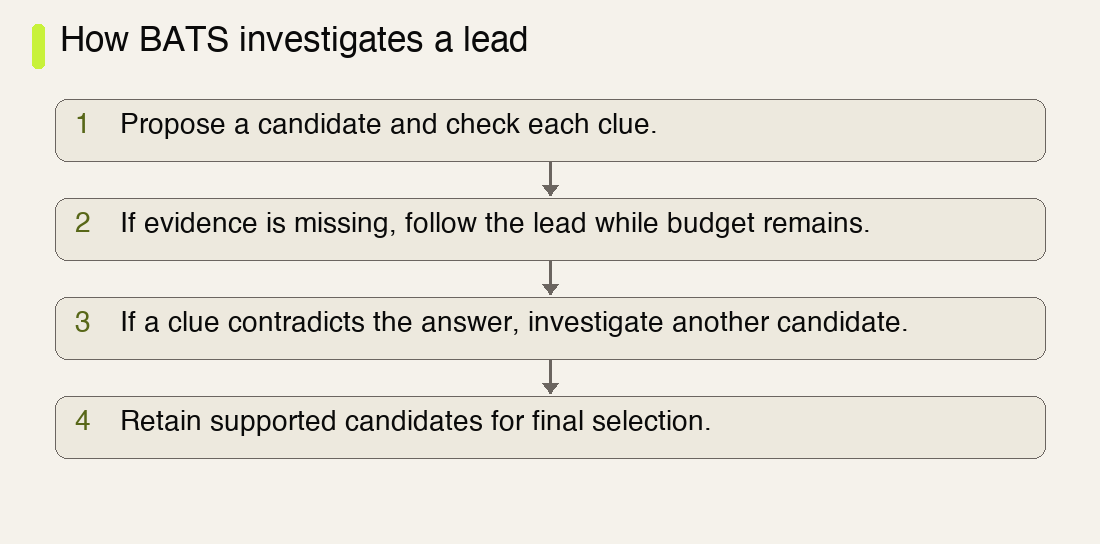
One example in the paper asks which two football teams played a match in the early 1990s. The clues include a Brazilian referee, four yellow cards and an early substitution following an injury. Searching for all of that at once might turn up a convincing match report. A useful next move would be to check the substitution time: a match that fits the referee and card count could still be the wrong game.
The researchers built that distinction into a second system called BATS. It keeps a checklist of leads and tests a proposed answer against the clues. With calls still available, it can investigate a missing detail or abandon a lead that conflicts with the evidence. In the main comparison it could make further attempts after finding a candidate, then use a model to select an answer.
The same allowance produced different results
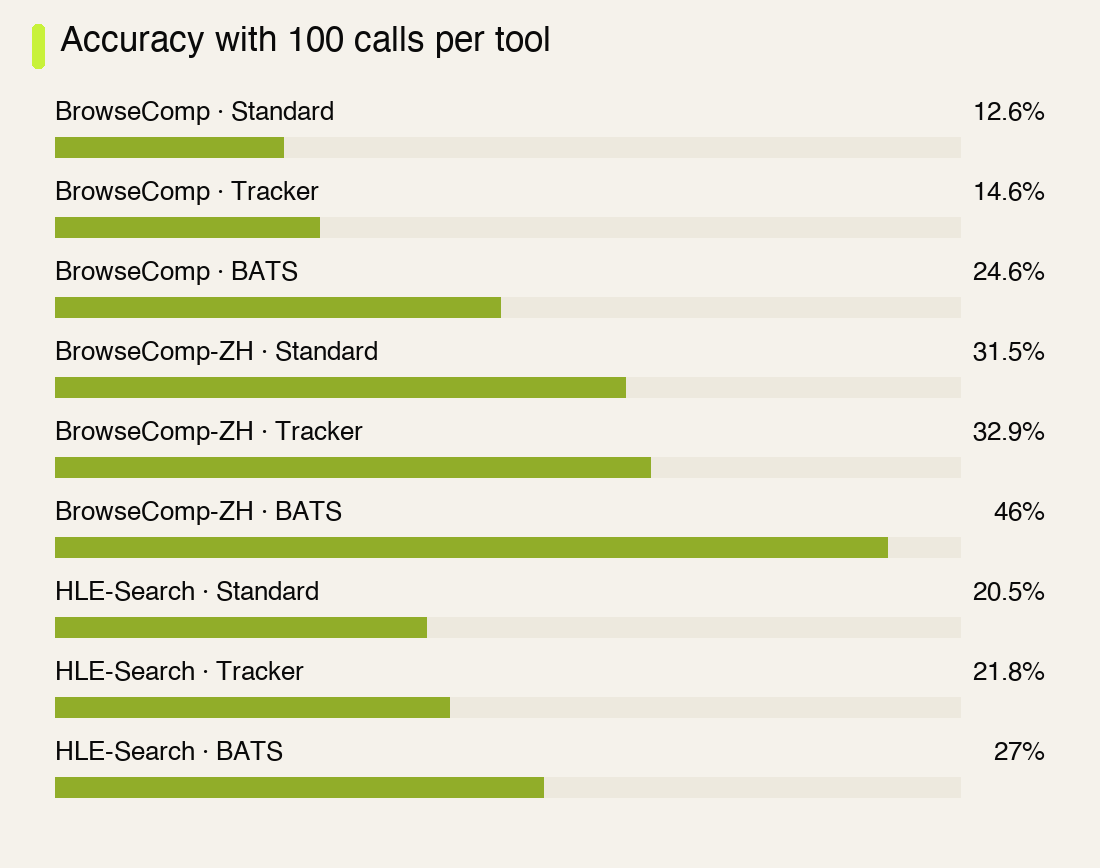
On BrowseComp, the full system rose from the standard agent’s 12.6% to 24.6%. On the Chinese-language BrowseComp-ZH test, it went from 31.5% to 46.0%. On HLE-Search, a set of expert-level questions selected because they require research, it rose from 20.5% to 27.0%. The authors also found that the tracker alone improved the average scores of Gemini 2.5 Flash and Claude Sonnet 4 on all three tests.
What the experiment establishes
The tracker alone accounted for two percentage points on BrowseComp. The much larger gain came from the full search procedure. Equal allowances also left room for different bills: agents could take different numbers of steps, read different amounts of text and revisit a question. The reported costs depend on the prices the researchers used.
Even with BATS, about three in four BrowseComp answers were scored wrong. These were deliberately difficult research questions, graded by another language model. The practical lesson is clearest in the football example. Once the agent has a plausible match, the most valuable remaining search may be the one that could rule it out.
Conclusion
A search allowance is useful only if the agent spends it on evidence that can settle the question. Planning and checking delivered a larger gain than the counter alone. Even the strongest configuration missed most questions on this difficult test.
Frequently asked questions
At the same ten-call limit, the tracker increased average cost from 5.2 to 6.8 cents. Its saving appeared when compared with an untracked agent allowed 100 calls per tool.
Submitting a search query and opening a result are separate actions with separate allowances.
Read the original research paper
Related study · To teach AI to use tools, researchers wrote the question last
Explore more Google research papers explained.