Web performance isn't "make it load faster" in the abstract — it's how quickly a user can see, read, and interact without jank, delays, or surprise layout shifts. Because styles sit directly on the critical rendering path, CSS performance optimization — including effective font optimization — is a core part of that experience. At the same time, image optimization and JavaScript performance play equally decisive roles within a broader technical SEO context.
In 2026, users arrive on wildly different devices and networks, and search engines increasingly reward pages that feel fast in the real world — not just in lab tests. Oversized images, inefficient scripting, and render-blocking resources are often the real bottlenecks behind poor Core Web Vitals.
Why Performance Matters
1. Users don't wait
When pages feel slow, users bounce before they've even processed your value proposition. Speed is product.
2. Performance is an SEO and growth lever
Search visibility and conversion performance are both strongly influenced by user experience signals. Google explicitly documents performance-focused UX metrics via Core Web Vitals.
3. "Fast" is multidimensional
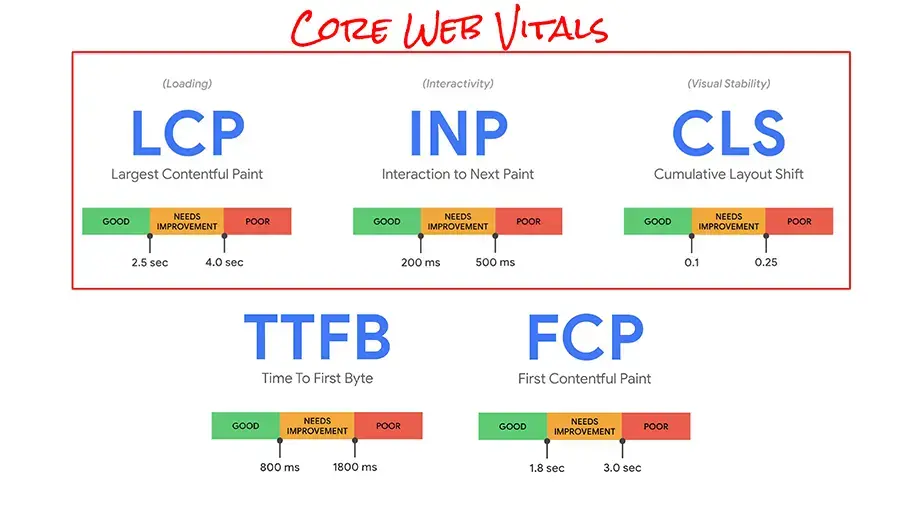
A site can be quick to show something (FCP) but slow to show the main content (LCP), fast to load but frustrating to use (INP), visually unstable (CLS), or slow to even start responding (TTFB). In 2026, you optimise for the whole experience — not one stopwatch number.
How Browsers and Servers Communicate (and Where Time Disappears)
A navigation is a chain of steps. Each step adds latency and can block later work.
Request lifecycleUser taps link
↓
DNS lookup (find server IP)
↓
Connection setup (TCP + TLS) ── or ── QUIC (HTTP/3)
↓
Request HTML
↓
Receive HTML (TTFB + download)
↓
Discover subresources (CSS / JS / fonts / images)
↓
Fetch critical resources
↓
Render + run JS + handle inputHTTP/1.1 vs HTTP/2 vs HTTP/3 (2026 Reality)
| Protocol | Connection model | Key performance characteristics |
|---|---|---|
| HTTP/1.1 | Multiple connections | Limited parallelism; requests often queue behind each other, causing head-of-line blocking at the HTTP level. |
| HTTP/2 | Single TCP connection | Multiplexes many requests over one connection, reducing HTTP-level blocking, but still vulnerable to TCP head-of-line blocking under packet loss. |
| HTTP/3 | QUIC over UDP | Eliminates TCP head-of-line blocking, reducing latency and improving performance on unreliable or high-loss networks. |
In practice, you don't optimise for a protocol — you remove avoidable round trips, prioritise critical bytes, and cache aggressively.
The 2026 Scorecard: What "Good" Performance Means
Core Web Vitals targets, measured at the 75th percentile of real users:
Important: INP replaced FID as the interaction metric, effective March 12, 2024.
Great Performance Measurement Uses Two Lenses
Lighthouse, synthetic tests. Synthetic and repeatable — great for debugging and CI baselines.
CrUX, Search Console, RUM. Reflects real user experience — messy but truthful, and what Google's CWV evaluation uses.
Learn to read a network waterfall — it reveals blocking, prioritisation mistakes, and oversized assets instantly.
A Modern Optimization Playbook (High Impact First)
1. Reduce bytes transferred
Every byte competes for bandwidth and delays rendering.
- Enable Brotli (gzip fallback)
- Remove unused CSS and dead JS
- Trim third-party scripts aggressively
2. Fix render-blocking and prioritisation
- Inline minimal critical CSS
- Load non-critical CSS asynchronously
- Defer most JavaScript
- Prioritise the LCP image
3. Make images cheap
- Use AVIF and WebP
- Serve responsive images with
srcsetandsizes - Always include
widthandheightattributes - Never lazy-load the LCP image
| Format | Typical size | Decode cost | Transparency | Best for |
|---|---|---|---|---|
| AVIF | Smallest | Higher | Yes | Photos / hero images |
| WebP | Small | Good | Yes | General-purpose |
| JPEG | Larger | Good | No | Legacy support |
| PNG | Often large | Good | Yes | Logos / UI |
Summary: The 2026 Performance Mindset
Modern web performance is the discipline of prioritising user-perceived speed:
FAQ
It's not just page load speed. Modern web performance is about how quickly a page becomes useful — users can see the main content, interact without delays, and experience a stable layout with no jumping elements. The common way to express this is via Core Web Vitals: LCP, INP, and CLS.
For SEO and real-user experience, prioritise LCP (how fast main content appears), INP (how responsive the page feels when users click, tap, or type), and CLS (how stable the layout is while loading). Google uses these as Core Web Vitals signals in Search.
Measured at the 75th percentile of real users: LCP ≤ 2.5s, INP ≤ 200ms, CLS < 0.1. These thresholds are widely referenced in Google's documentation and web.dev guidance.
Because Lighthouse is a lab test — useful, but not the whole truth. A site can score well in lab conditions and still feel slow for real users due to slow mobile CPUs, third-party scripts blocking the main thread, poor caching, large images delivered too early, and server latency or network variability. Combine lab tools with field monitoring.
Not automatically. HTTP/3 (QUIC) can reduce connection overhead and avoid TCP-level head-of-line blocking, but real wins depend on CDN and server configuration, network conditions, resource prioritisation and caching. Think of HTTP/3 as a helpful foundation — not a substitute for optimisation.
In order of typical impact:
- Optimise images (AVIF/WebP + responsive sizing)
- Reduce JavaScript (remove unused code, defer, code-split)
- Enable modern compression (Brotli + gzip fallback)
- Fix caching headers for static assets
- Prioritise LCP resources (hero image, critical CSS)
Yes — but treat minification as baseline hygiene, not the main event. The bigger wins come from removing unused CSS, cutting dead JS paths, trimming third-party scripts, and shipping less code to begin with. Minify + ship less is the winning combination.
Not as much as in the HTTP/1 days. HTTP/2 and HTTP/3 handle parallel requests better, so the modern priority is reducing total bytes, reducing critical path round trips, avoiding render-blocking, and caching efficiently. Reducing requests can still help for third-party resources, but bytes and prioritisation usually matter more.
No. Browser support for HTTP/2 Server Push has largely been removed. Modern alternatives include rel="preload" where appropriate, 103 Early Hints if supported by your stack or CDN, and smarter caching and bundling strategies.
AVIF often produces the smallest files for photos, but WebP remains excellent and can be faster to decode in some contexts. The best approach: serve AVIF with WebP fallback, use responsive images with srcset and sizes, and never lazy-load the LCP image.
Common causes: images or iframes without width/height, late-loading fonts causing text reflow, injecting banners or popups above content, and dynamic UI that pushes content down. Fixes: reserve space with explicit dimensions, avoid moving content after first render, and use font loading strategies that reduce reflow.
INP usually improves by reducing main-thread work: break up long JS tasks, reduce hydration cost on SPA-heavy pages, code-split and defer non-critical scripts, audit and trim third-party tags, and avoid expensive layout thrashing.
Lab data is synthetic and repeatable — great for debugging. Field data reflects real user experience — messy but truthful, and what Google's Core Web Vitals evaluation uses. Use both: lab to find issues fast, field to verify impact.
A solid toolkit: Chrome DevTools (Network waterfall + Performance panel), Lighthouse (lab audits and CI baselines), CrUX or Search Console Core Web Vitals (field performance insights), and RUM tools for per-page, per-device monitoring.
- Identify the LCP element (often hero image or headline section)
- Ensure it's properly sized and prioritised
- Remove or defer render-blocking JS
- Convert and resize images above the fold
- Verify caching and compression on text assets
- Re-test with throttling and check Core Web Vitals impact
Google documents page experience signals, including Core Web Vitals, as part of the overall ranking picture, while also emphasising that relevance remains the primary factor.
No — inline CSS can speed initial render, but it increases HTML size and reduces caching benefits. It's worth it in some architectures, not all.
If a single CSS bundle contains lots of unused rules per template, splitting often improves initial render by reducing download and parse work.
References
web.dev — "Understanding Core Web Vitals and Google search results"
web.dev — "Optimize Largest Contentful Paint"
web.dev — "Optimize Interaction to Next Paint"
Mozilla Developer Network — "HTTP/3"